Most WordPress chatbot plugins charge $39 to $500 per month. They lock you into SaaS subscriptions, limit your conversations, and control your data. But there is a better way: a self-hosted AI chatbot plugin that costs nothing to run and lives entirely on your server. An AI chatbot WordPress plugin built for self-hosting is the most cost-effective way to add AI assistance to your site.
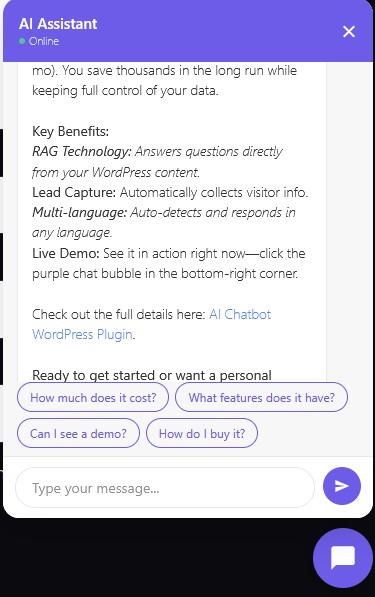
An AI chatbot WordPress plugin built for self-hosting lets you bring your own API key, search your own content for answers, and capture leads without paying monthly fees. Google Gemini offers a free tier with 500 requests per day, enough for most small business websites. This guide covers the 10 best features of a self-hosted chatbot plugin and why they matter for your WordPress site.
What Is a Self-Hosted AI Chatbot WordPress Plugin?
A self-hosted AI chatbot plugin runs entirely on your WordPress installation. Unlike SaaS chatbots like Tidio or Chatbase, it does not route your visitor conversations through external servers. The plugin installs on your site, stores conversations in your database, and calls the AI API directly from your server.
The key difference is control. With a SaaS chatbot, the provider owns your conversation data, sets your message limits, and can change pricing at any time. With a self-hosted plugin, you own everything. Your API key stays in your database. Your conversation logs stay in your MySQL. Your visitors interact with AI running through your infrastructure, not a third-party platform.
1. RAG: Your Chatbot Reads Your Content
RAG (Retrieval-Augmented Generation) is what separates a generic chatbot from a site-specific assistant. Without RAG, your chatbot answers from the AI model’s general knowledge. With RAG, it searches your WordPress posts, pages, products, and categories for relevant content, then uses that content to answer questions.
When a visitor asks “What services do you offer?”, the RAG system searches your published posts and pages for keywords like “services” and “offer.” It finds your actual content, extracts the most relevant snippets, and passes them to the AI as context. The AI then answers based on your real services, not a generic response about what services might be.
A good self-hosted plugin implements weighted RAG. Title matches score higher than content matches. Tag and category matches add relevance. This means a visitor asking about “product photography” finds your product photography article, even if the exact phrase does not appear in the title.
2. Conversation Memory for Context-Aware Responses
Most basic chatbots treat every message as standalone. A visitor asks “What is n8n?” and gets an answer. Then they ask “Can it connect to WordPress?” and the bot has no idea what “it” refers to. Conversation memory fixes this.
The plugin stores the last 10 messages in each conversation session. When a visitor sends a follow-up question, the previous context is included in the AI prompt. So “Can it connect to WordPress?” becomes clear because the bot knows the previous question was about n8n. The AI responds: “Yes, n8n can connect to WordPress through its dedicated WordPress node, allowing you to automate post creation and publishing.”
This creates a natural conversation flow instead of disconnected question-answer pairs. Visitors feel like they are talking to someone who understands context, not a search box that resets after every message.
3. Lead Capture Without Monthly Fees
Every chatbot should generate leads, not just answer questions. A self-hosted plugin detects buying intent and human handoff requests automatically. When a visitor mentions pricing, products, or asks to speak with someone, the bot asks for their email address.
The captured email is stored in your WordPress database, and you receive an email notification with the full conversation transcript. You know exactly what the visitor asked, what the bot answered, and how to follow up. No CRM subscription required, no Zapier integration needed.
For businesses selling services, this is the most valuable feature. A visitor lands on your site at 2 AM, asks about your pricing, leaves their email, and you wake up to a qualified lead in your inbox. The chatbot handled the initial conversation, captured the contact info, and delivered it to you. All for zero monthly cost.
4. Multi-Language Auto-Detection
If your visitors speak multiple languages, your chatbot should too. A self-hosted plugin can auto-detect the language of each message and respond in that same language. A Serbian visitor asking “Sta je n8n?” gets a response in Serbian. An English visitor asking “What is n8n?” gets English.
This works because the AI model (Gemini, GPT, or others) is inherently multilingual. The plugin simply instructs the model to detect and match the user’s language. No translation API needed, no separate language configurations, no manual language switching.
For European businesses serving customers across borders, this is essential. A restaurant in Serbia might get visitors from Croatia, Bosnia, Hungary, and Germany. The chatbot handles all of them in their native language using the same single configuration.
5. Quick Reply Buttons for Guided Conversations
Quick reply buttons are clickable suggestions that appear after each bot response. Instead of forcing visitors to type, they can tap “What products do you have?” or “How much does it cost?” with one click. This increases engagement dramatically, especially on mobile devices where typing is inconvenient.
The best plugins generate contextual quick replies. If the visitor asked about n8n, the buttons might suggest “What is ComfyUI?”, “How to automate WordPress?”, and “What products do you have?” If they asked about pricing, the buttons shift to “How to buy?”, “Tell me about n8n”, and “Contact support.”
This guides visitors through your site’s content naturally. They discover topics they did not know you covered. They find products they did not know you sold. And they never have to think about what to type next.
6. n8n Integration for Workflow Automation
This is where a self-hosted plugin separates itself from every SaaS competitor. n8n integration lets you forward chatbot messages to n8n webhooks for CRM automation, email sequences, ticket creation, or any workflow you can build.
A visitor asks about your services, the chatbot answers, and n8n simultaneously creates a contact in your CRM, sends a follow-up email sequence, and notifies your team in Slack. All triggered by the chatbot conversation, all automated through n8n, all running on your own infrastructure.
For businesses already using n8n for automation, this turns the chatbot from a standalone widget into a trigger source for your entire automation stack. Every conversation becomes a potential workflow trigger. Every lead capture becomes a CRM entry. Every support request becomes a ticket.
7. GDPR Compliance and Data Ownership
EU regulations require telling users they are interacting with AI (EU AI Act) and processing their data lawfully (GDPR). A self-hosted plugin handles both. It displays a “Powered by AI” notice under the welcome message, informing visitors that their messages are processed to generate responses.
Conversation data stays in your WordPress database with configurable retention periods. By default, conversations older than 30 days are automatically deleted via a daily cron job. You control the retention period from the admin panel. No data leaves your server except the API call to Gemini or OpenAI, which processes and returns the response without storing it.
Security features include rate limiting (30 requests per minute per IP), spam protection with honeypot fields and pattern detection, CORS origin checking (only your site can call the chat endpoint), and input sanitization. Your API key never appears in the browser, only in the server-side PHP backend.
8. Chatbot Modes: Sales, Explain, Support, Custom
Not every website needs the same chatbot personality. A restaurant wants to sell menu items. A tech blog wants to educate readers. A SaaS company wants to help users troubleshoot. One chatbot tone does not fit all.
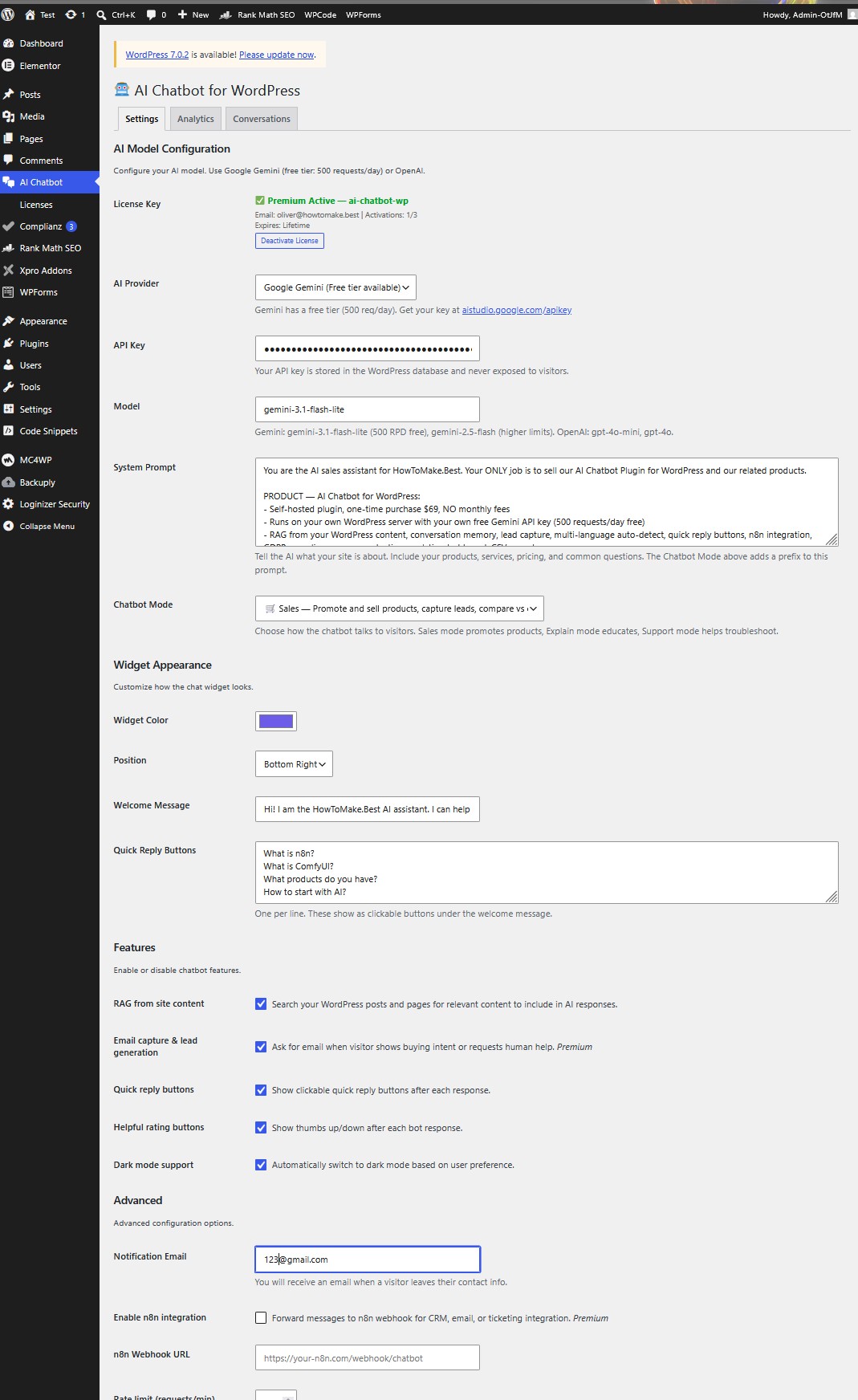
The plugin offers four chatbot modes, selectable from the admin panel with a single dropdown:
- Sales mode promotes products, mentions pricing, compares to competitors, asks for email to follow up. Quick replies show “How much does it cost?”, “What features?”, “Can I see a demo?”, “How do I buy it?”
- Explain mode educates visitors, links to articles, provides clear answers. Quick replies show “What topics do you cover?”, “Latest articles?”, “What tools do you recommend?”, “How to get started?”
- Support mode helps troubleshoot, answers FAQs step-by-step, offers human handoff. Quick replies show “I need help”, “How does this work?”, “Billing question”, “Talk to a human”
- Custom mode uses only your system prompt with no added behavior prefix. Full control over tone and behavior.
Each mode adds a behavior prefix to your system prompt. You still write your own prompt describing your business, products, and services. The mode prefix tells the AI how to behave on top of that. Switch modes instantly from the admin panel without touching code.
9. Spam Protection and Security
Running a chatbot on your WordPress site introduces a new endpoint that accepts user input. Security is not optional. The self-hosted plugin includes multiple layers of protection that work together to keep your site and your visitors safe.
Rate limiting caps requests at 30 per minute per IP address. This prevents automated abuse and keeps your API costs under control. A honeypot field catches bots that fill hidden form fields. A timing check rejects messages sent less than one second after page load, since real humans need time to read and type. Pattern detection blocks messages containing multiple spam indicators like links, casino terms, or common spam keywords.
CORS origin checking ensures only your website can call the chat endpoint. Other domains attempting to use your API key through their own sites are blocked. Your API key never appears in the browser, only in the server-side PHP backend. User messages are sanitized with HTML stripping and length limits. Bot messages escape all HTML before rendering to prevent injection attacks.
10. Analytics Dashboard and CSV Export
The plugin includes an analytics dashboard in the WordPress admin panel. You can track total messages, unique sessions, leads captured, average response time, and visitor satisfaction ratings. Every conversation is logged with the message, bot response, page URL, response time, and any captured email addresses.
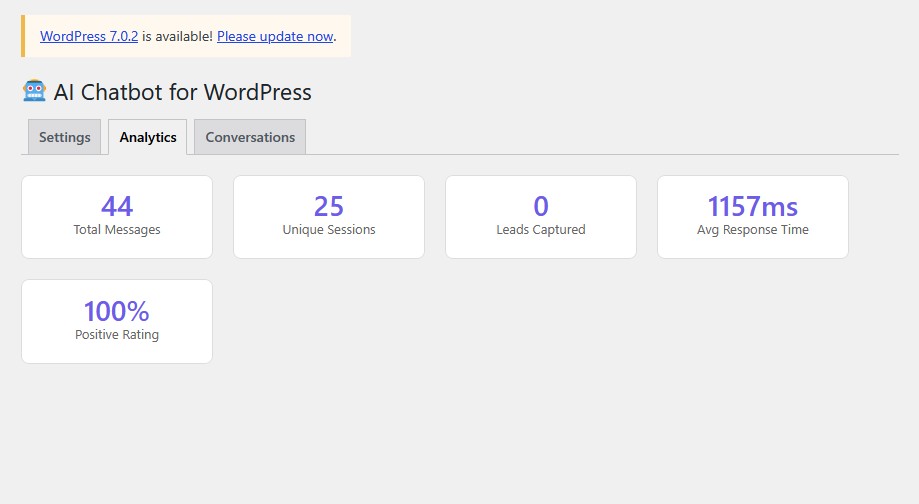
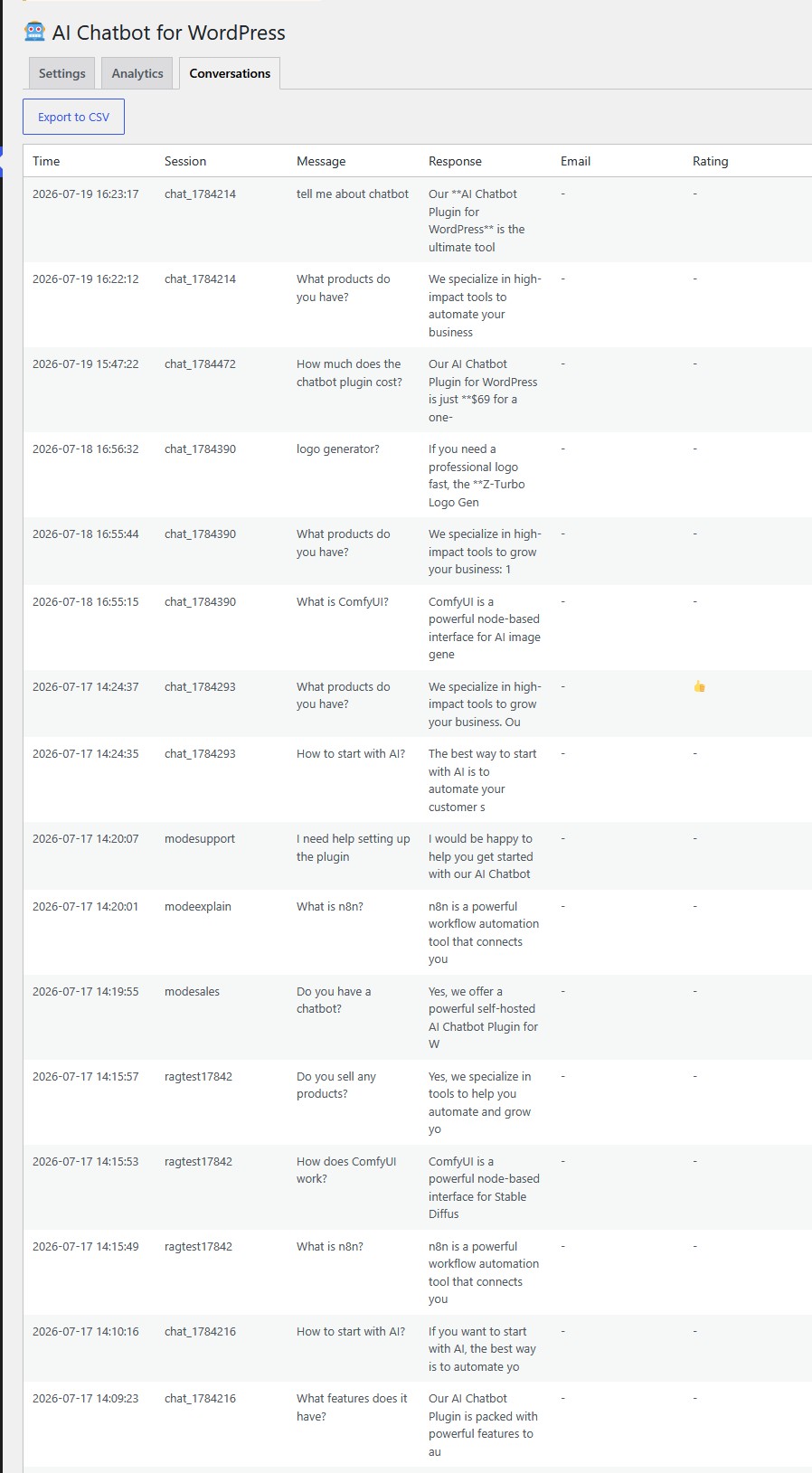
The conversations tab shows your 50 most recent chats in a table format. You can export all conversations to CSV for analysis in Excel or Google Sheets. A daily cron job aggregates statistics and cleans up old data based on your configured retention period.
This data tells you what visitors actually ask about, which pages generate the most conversations, how fast your AI responds, and whether visitors find the answers helpful. You use this to improve your system prompt, add content for popular questions, and identify which products generate the most interest.
How to Set Up Your AI Chatbot WordPress Plugin
Setting up a self-hosted AI chatbot plugin takes 5 minutes:
- Install the plugin via WordPress admin (Plugins > Add New > Upload)
- Activate the plugin
- Go to the AI Chatbot settings page
- Choose your chatbot mode: Sales, Explain, Support, or Custom
- Enter your free Google Gemini API key from aistudio.google.com/apikey
- Write your system prompt describing your business, products, and services
- Customize widget color, position, welcome message, and quick replies
- The chat widget appears automatically on every page
The free Gemini tier gives you 500 requests per day. For most small business websites, this is more than enough. If you need higher limits, you can switch to OpenAI, OpenRouter, or upgrade to a paid Gemini plan, all from the same settings page.
AI Chatbot Plugin vs SaaS Chatbots
| Feature | Self-Hosted Plugin | Tidio | Chatbase |
|---|---|---|---|
| Monthly cost | $0 (free Gemini tier) | $39/mo | $40-500/mo |
| Per-conversation fees | None | Limited | Credit-based |
| RAG from your content | Yes | No | Yes (paid) |
| Conversation memory | Yes | Limited | Yes |
| Chatbot modes | Sales/Explain/Support/Custom | No | No |
| n8n integration | Yes | No | No |
| Multi-language | Auto-detect | Manual | Limited |
| Data ownership | Full (your DB) | Their servers | Their servers |
| GDPR compliance | Built-in | Partial | Partial |
| Lead capture | Free | Paid plan | Paid plan |
| Spam protection | Honeypot + pattern + timing | Basic | Basic |
| Analytics + CSV export | Yes | Paid plan | Limited |
| Vendor lock-in | None | High | High |
Who Should Use a Self-Hosted AI Chatbot?
This plugin is ideal for WordPress site owners who want AI chatbot functionality without recurring costs:
- Small businesses with limited budgets who cannot justify $39+ monthly chatbot subscriptions
- Agencies managing multiple client sites who want to avoid per-site SaaS licensing
- Privacy-conscious site owners who want full control over conversation data
- n8n users who want to trigger automation workflows from chatbot conversations
- European businesses needing GDPR compliance without third-party data processing
- Multi-language sites serving visitors across different regions
- Online stores that want a Sales mode chatbot to promote products and capture leads
- Tech blogs that want an Explain mode chatbot to educate readers and link to articles
- SaaS companies that want a Support mode chatbot to help users troubleshoot
Frequently Asked Questions
Do I need coding skills to use this plugin? No. Install it like any WordPress plugin, enter your API key, choose a chatbot mode, and the chatbot appears on your site. The admin settings page handles all configuration through forms and dropdowns.
Is the Gemini API really free? Google Gemini offers a free tier with 500 requests per day. For a typical small business site getting 10-50 chat messages per day, this is more than enough. You only pay if you exceed the free tier and upgrade to a paid plan.
Can I use OpenAI instead of Gemini? Yes. The plugin supports Gemini, OpenAI, and OpenRouter. Switch providers from the settings page. You can use any model available on your chosen provider.
What are chatbot modes? The plugin offers four modes: Sales (promotes products and captures leads), Explain (educates visitors and links to articles), Support (helps troubleshoot and offers human handoff), and Custom (you write the entire behavior). Switch modes instantly from the admin panel without touching code.
What happens to conversation data? Conversations are stored in your WordPress MySQL database. They are automatically deleted after 30 days (configurable). You can export conversations to CSV at any time. No data is sent anywhere except the AI API call, which does not store your conversations.
Can the chatbot learn from my WooCommerce products? The RAG system searches all published content including WooCommerce products, custom post types, pages, and posts. Product titles, descriptions, and categories are all searchable and used as context for AI responses.
Performance and Page Speed Impact
Page speed matters for SEO and user experience. A self-hosted chatbot plugin loads with a deferred script tag, meaning it does not block page rendering. The widget JavaScript is under 13 KB, smaller than most analytics tracking codes. The chat bubble appears after the page finishes loading, ensuring your Core Web Vitals scores are not affected.
The PHP backend processes messages server-side using WordPress native functions like wp_remote_post. No additional JavaScript frameworks, no React, no jQuery dependencies. The widget is vanilla JavaScript that works in any modern browser without polyfills. This keeps the plugin lightweight and compatible with any WordPress theme.
For sites using caching plugins like WP Rocket or LiteSpeed Cache, the chatbot API endpoint is automatically excluded from caching because it uses POST requests. The widget JavaScript file is static and cacheable, so returning visitors load it from browser cache instantly. The only uncached request is the actual chat message, which takes 1-2 seconds via Gemini free tier.
Customization Options
Every aspect of the chatbot is configurable from the WordPress admin panel. You choose the widget color to match your brand. You set the position (bottom-right or bottom-left). You write the welcome message that visitors see first. You define the quick reply buttons that guide conversations. You select the chatbot mode (Sales, Explain, Support, or Custom). And you control the system prompt that tells the AI what your business does.
The system prompt is where the magic happens. This is your instruction to the AI about what your site covers, what products you sell, what prices you charge, and how the bot should behave. A restaurant might write: “You are the assistant for Joe Pizza in Belgrade. We serve pizza, pasta, and salads. Delivery is 300 RSD, minimum order 1500 RSD. We are open 11 AM to 11 PM. Answer questions about our menu, pricing, and delivery areas.”
The bot then answers based on that prompt plus RAG from your actual posts and pages. Visitors asking “Do you deliver to Vraar?” get an answer based on your delivery area content. Visitors asking “How much is a margherita?” get your actual price. The system prompt combined with RAG makes the bot specific to your business, not a generic AI that could be talking about anyone.
Cost Comparison Over One Year
The financial difference between a self-hosted plugin and SaaS chatbots compounds over time. Here is a realistic cost comparison for a small business website receiving 20 chat conversations per day:
- Self-hosted plugin: $0 per month (Gemini free tier covers 500 requests/day easily)
- Tidio Lyro AI: $39 per month = $468 per year
- Chatbase starter: $40 per month = $480 per year
- Drift starter: $2,500 per month = $30,000 per year
Over one year, the self-hosted plugin saves you $468 compared to Tidio, $480 compared to Chatbase, and $30,000 compared to Drift. The only cost is the 5 minutes it takes to install and configure. If your needs grow beyond 500 daily requests, Gemini paid tier starts at $4 per million tokens, still cheaper than any SaaS subscription.
Try the Live Demo
Click the purple chat bubble in the bottom-right corner of this page and ask about AI tools, n8n, ComfyUI, or our products. That is the exact same plugin described in this article, running on the exact same infrastructure. Switch between Sales, Explain, and Support modes to see how the chatbot adapts its tone and behavior.
The live demo uses the free Gemini API tier. No tricks, no limited trial, no credit card required. This is the actual plugin you install on your own site, configured with a Sales mode system prompt and RAG from our published content.