
I run n8n every day to automate content production. This is the actual workflow that generates images for my WordPress posts — with real screenshots from my live instance.
The Full Workflow
The ComfyUI Image Generator workflow has 5 nodes: a sticky note, a Webhook, a Validate & Prepare Code node, a Generate Images Code node, and a Respond node. Data flows left to right — HTTP request in, image URLs out.
1. Webhook Node: The Entry Point
The Webhook node listens for POST requests at /webhook/comfy-img. I send a JSON payload from my content pipeline with the model name and image prompts. The node has a 300-second timeout because ComfyUI generation takes time.
Configuration:
- HTTP Method: POST
- Path:
/webhook/comfy-img - Response Mode: Last Node (waits for the full pipeline before responding)
- Timeout: 300 seconds
2. Validate & Prepare Node
This Code node normalizes input. It validates the model name, supports both array and legacy prompt formats, and builds the internal data structure that ComfyUI expects.
Key logic:
// Normalize input for ComfyUI image generation
const body = $input.first().json.body || $input.first().json;

const model = body.model || 'ernie';
const validModels = ['ernie', 'juggernaut', 'zturbo'];
if (!validModels.includes(model)) {
  throw new Error('Invalid model: ' + model);
}

// Support both array format and legacy hero/section format
let imagePrompts = body.prompts || [];
if (imagePrompts.length === 0 && body.heroPrompt) {
  imagePrompts.push({ prompt: body.heroPrompt, negPrompt: body.negPrompt });
}
Three models are available: ernie (text-in-image), juggernaut (photorealistic), and zturbo (fast logos).
3. Generate Images Node
This is the core — it constructs a ComfyUI API request, sends it to my local ComfyUI instance, polls for completion, and collects the output image URLs.
Model configuration:
| Model | Loader | Default Steps | CFG | Use Case |
|---|---|---|---|---|
| ernie | UNETLoader | 50 | 4.0 | Text-in-image generation |
| juggernaut | CheckpointLoaderSimple | 30 | 7.0 | Photorealistic images |
| zturbo | UNETLoader | 20 | 2.0 | Fast logo generation |
Each model has its own checkpoint file, CLIP loader, VAE, latent image class, and sampler settings. The node dynamically constructs the workflow JSON based on which model was requested.
4. Respond Node
Simple passthrough that formats the final output:
var d = $input.first().json;
return [{json:{
  success: d.success,
  model: d.model,
  images: d.images,
  errors: d.errors,
  imageCount: d.imageCount,
  generation_time_ms: d.generation_time_ms
}}];
This returns a clean JSON response to the caller with image URLs, generation time, and any errors.
How These Nodes Connect in Practice
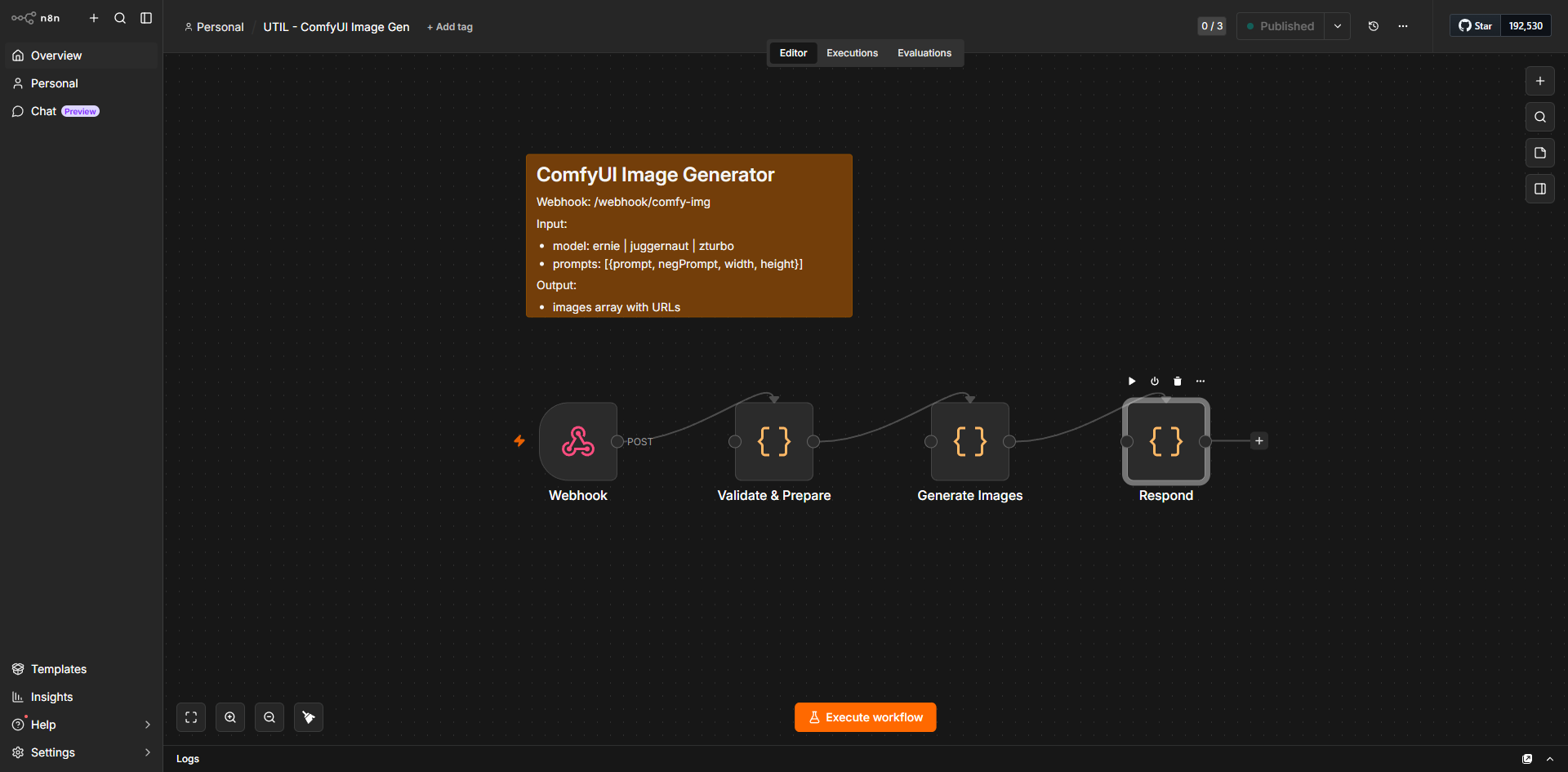
- Webhook receives POST with model name and prompts array
- Validate & Prepare checks the model, normalizes prompts, sets defaults
- Generate Images builds ComfyUI API request, sends it, polls for results
- Respond formats the output and returns image URLs
End to end, a single image generation takes about 20 seconds. The workflow processes multiple prompts in parallel within ComfyUI.
Why These Three Node Types Matter Most
| Node Type | Role | Without it… |
|---|---|---|
| Webhook | Entry point | No external triggers possible |
| Code | Logic engine | Stuck with built-in nodes, no API flexibility |
| Code (respond) | Output formatter | Raw ComfyUI response leaks internal details |
Source
Screenshots captured from my live n8n instance. The ComfyUI Image Generator workflow is one of 16+ active workflows powering my content automation pipeline.